Hardware Evolution
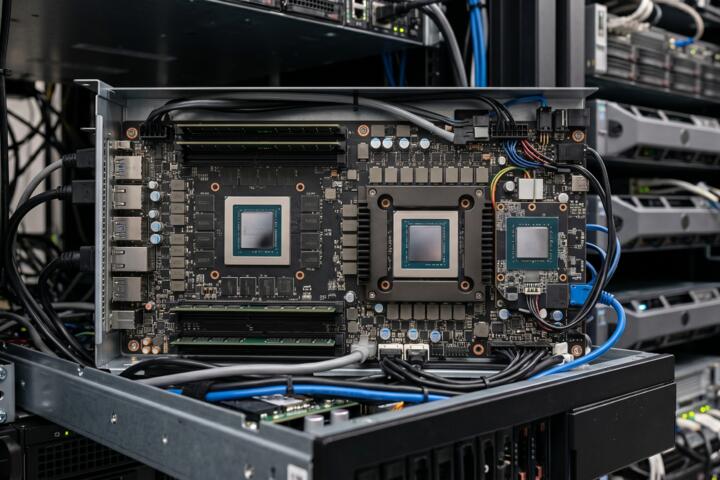
Artificial Intelligence has moved past the era of general-purpose computing. While a standard CPU handles a wide variety of tasks using complex logic branches, AI workloads require massive parallelism—performing thousands of identical mathematical operations simultaneously. This shift led to the rise of specialized accelerators designed to optimize tensor operations and matrix multiplications.
In practice, training a Large Language Model (LLM) like Llama 3 on traditional CPUs would take decades. By utilizing high-bandwidth memory (HBM) and thousands of small, efficient cores, specialized silicon reduces this timeframe to weeks. For instance, the transition from Pascal to Blackwell architectures has seen a 1000x increase in compute efficiency for specific AI tasks over just eight years.
Industry data shows that 85% of enterprise AI budgets are now directed toward hardware acceleration. Real-world performance isn't just about "speed," but about "performance per watt," a metric where specialized chips outperform general processors by a factor of 10x to 50x depending on the specific workload complexity.
Infrastructure Gaps
The most common mistake in AI infrastructure is "over-provisioning" or choosing the wrong chip for the specific phase of the AI lifecycle. Many teams deploy high-end training clusters for simple inference tasks, leading to astronomical cloud bills without a linear increase in performance. This mismatch occurs because the requirements for "learning" (training) and "doing" (inference) are fundamentally different.
Memory wall issues are another significant pain point. Even the fastest chip will sit idle if the data cannot be fed into the cores quickly enough. Engineers often focus on TFLOPS (Teraflops) while ignoring memory bandwidth, resulting in hardware that operates at only 20-30% utilization. This inefficiency directly impacts the ROI of AI projects, often stalling them in the pilot phase.
Real-world consequences include thermal throttling in edge devices and "cold start" latencies in serverless AI functions. In the medical sector, using an unoptimized NPU for real-time imaging can lead to frame drops, which is unacceptable in surgical environments. Proper hardware alignment is not a luxury; it is a prerequisite for production-grade reliability.
Optimization Paths
The Versatility of Graphics Units
Graphics Processing Units (GPUs) remain the gold standard for flexibility. Built with thousands of CUDA or Stream Processor cores, they excel at both training and inference. Brands like NVIDIA with their H100 and A100 series dominate this space because of the robust software ecosystem, including libraries like cuDNN and TensorRT.
For a developer, this means a "write once, run anywhere" experience. If you are experimenting with new architectures like State Space Models (SSMs) or hybrid Transformers, GPUs are the safest bet. They provide the necessary memory capacity (up to 80GB-141GB HBM3e) to hold massive parameter sets during the backpropagation phase of training.
Tensor Units for Scale
Tensor Processing Units (TPUs) are Google's answer to large-scale deep learning. Unlike GPUs, which are multi-purpose, TPUs are Application-Specific Integrated Circuits (ASICs) designed strictly for matrix math. This specialization allows for extreme efficiency in massive "pod" configurations where thousands of chips work as a single unit via high-speed interconnects.
When using Google Cloud Platform (GCP), TPUs (v4, v5p) offer a superior price-to-performance ratio for Transformer-based models. They utilize a systolic array architecture, which reduces the need to constantly access the register file, significantly lowering power consumption while maintaining high throughput for BF16 and INT8 data types.
Neural Units for the Edge
Neural Processing Units (NPUs) are designed for local execution on consumer devices like smartphones, laptops, and IoT sensors. Companies like Apple (Neural Engine), Qualcomm (Hexagon), and Intel (Core Ultra) integrate these to handle "always-on" tasks such as background blur, voice recognition, and local LLM execution without draining the battery.
NPUs prioritize energy efficiency over raw power. They are often optimized for low-precision quantization (4-bit or 8-bit), which shrinks model size significantly. On a modern MacBook with an M3 Max, the NPU allows for running a 7B parameter model locally with minimal impact on system responsiveness, keeping data private and reducing cloud dependency.
Balancing Latency and Throughput
To optimize performance, you must distinguish between throughput (how much data is processed per second) and latency (how fast a single request is handled). For batch processing of millions of images, a TPU cluster is ideal. However, for a real-time chatbot where a human is waiting for a response, a GPU with high-speed inference kernels is often better.
Using tools like vLLM or NVIDIA Triton Inference Server can help bridge this gap. These software layers implement techniques like continuous batching and PagedAttention, which maximize the hardware's capability. Statistics show that optimized software stacks can increase hardware utilization by up to 4x compared to "out-of-the-box" configurations.
The Role of Interconnects
Hardware is only as strong as its weakest link, which is often the connection between chips. Technologies like NVLink (NVIDIA) or ICI (Google) allow chips to share memory pools. For models exceeding 100B parameters, the bottleneck shifts from the chip's calculation speed to the bandwidth of the fabric connecting the cluster.
When building a private cluster, investing in InfiniBand or 400G Ethernet is as crucial as the chips themselves. Without high-speed interconnects, the "distributed training" efficiency drops sharply as the number of nodes increases. Aim for a linear scaling factor; if doubling your hardware only gives you a 1.5x speedup, your interconnect is the culprit.
Deployment Cases
A mid-sized FinTech firm was struggling with the cost of running a real-time fraud detection model on standard cloud CPUs. The latency was 450ms per transaction, leading to a poor user experience. By migrating the inference to NVIDIA T4 GPUs and optimizing the model with TensorRT, they reduced latency to 35ms and cut their monthly compute spend by 60%.
An agricultural tech startup used NPUs in drones for real-time crop analysis. Initially, they tried sending data to the cloud, but connectivity in rural areas was unreliable. By deploying a pruned version of YOLOv8 on an integrated NPU (using the Hailo-8 platform), they achieved 30 FPS processing locally on a 5W power budget, enabling autonomous flight and instant feedback.
Hardware Selection
| Feature | GPU (Generic) | TPU (Cloud) | NPU (Edge) |
|---|---|---|---|
| Primary Use | Training & Versatile Inference | Large-scale Transformer Training | On-device Inference |
| Flexibility | Highest (Any model type) | Medium (Optimized for Tensors) | Low (Specific to architecture) |
| Power Efficiency | Moderate | High | Ultra-High |
| Cost Model | High CapEx / Variable OpEx | Usage-based (GCP) | Low per-unit cost |
| Best Brands | NVIDIA, AMD | Google (Custom) | Apple, Qualcomm, Intel |
Avoiding Pitfalls
Avoid the "Latest is Best" trap. While the H100 is significantly faster than the A100, many mid-sized models do not require that level of compute. For models under 13B parameters, using last-gen hardware or specialized "L" series GPUs (like the L4) can provide a much better cost-per-token ratio.
Don't ignore quantization. Many engineers believe they need 16-bit precision for everything. However, moving to INT8 or FP8 precision can double your throughput on modern hardware without a noticeable drop in accuracy. Always test the "perplexity" of your model after quantization before committing to a hardware purchase.
Ensure your software stack is compatible. NPUs, in particular, often require specific compilers (like CoreML for Apple or OpenVINO for Intel). If your research team writes code in a niche framework that isn't supported by the NPU's compiler, the hardware becomes a paperweight. Check the compatibility matrix of your target hardware early in the development cycle.
FAQ
Can I train a model on an NPU?
Technically no. NPUs are designed for inference—the "execution" phase of AI. They lack the memory bandwidth and high-precision floating-point support (FP32) required for the gradient updates involved in training.
Is AMD a viable alternative to NVIDIA?
Yes, especially with the Instinct MI300 series. While NVIDIA has a better software ecosystem (CUDA), AMD's ROCm platform is rapidly maturing, and their hardware often offers more VRAM for the price, which is vital for large model inference.
What is the "Memory Wall" in AI hardware?
It refers to the phenomenon where the processor's speed increases much faster than the speed of accessing data from memory. This leads to the processor waiting for data, making memory bandwidth the actual limiting factor in AI performance.
Do I need a GPU for simple RAG applications?
For small-scale Retrieval-Augmented Generation (RAG) using 7B parameter models, you can often get away with high-end CPUs if the concurrency is low. However, for a production environment with multiple users, an entry-level GPU like the NVIDIA A10 or L4 is recommended.
Why are TPUs exclusive to Google Cloud?
TPUs are proprietary ASICs developed by Google for their own data centers. Unlike GPUs, Google does not sell the physical chips to the public; they offer access through their cloud infrastructure as a service (IaaS).
Author’s Insight
In my experience building AI clusters, the most overlooked factor isn't the chip—it's the cooling and power delivery. I have seen million-dollar H100 setups underperform because of thermal throttling in poorly ventilated racks. My advice: prioritize a "balanced" build. If you're spending $30,000 on a node, don't skimp on the NVMe storage or the networking fabric. Hardware is a symphony, and a single slow component will ruin the performance of the most expensive accelerator.
Summary
Understanding the distinction between GPUs, TPUs, and NPUs is essential for any modern AI strategy. Start by identifying your primary goal: if it is research and flexibility, go with GPUs; if it is massive-scale Transformer training, leverage TPUs; and if it is low-power user experience, optimize for NPUs. To stay competitive, perform a rigorous cost-benefit analysis of your compute requirements every six months, as the silicon landscape is evolving faster than the software it supports. Align your hardware with your specific model architecture to ensure maximum efficiency and minimal waste.